Quick answer: Put your explainer video on the homepage, in or directly under the hero section, where it is visible without scrolling on desktop and within one swipe on mobile.
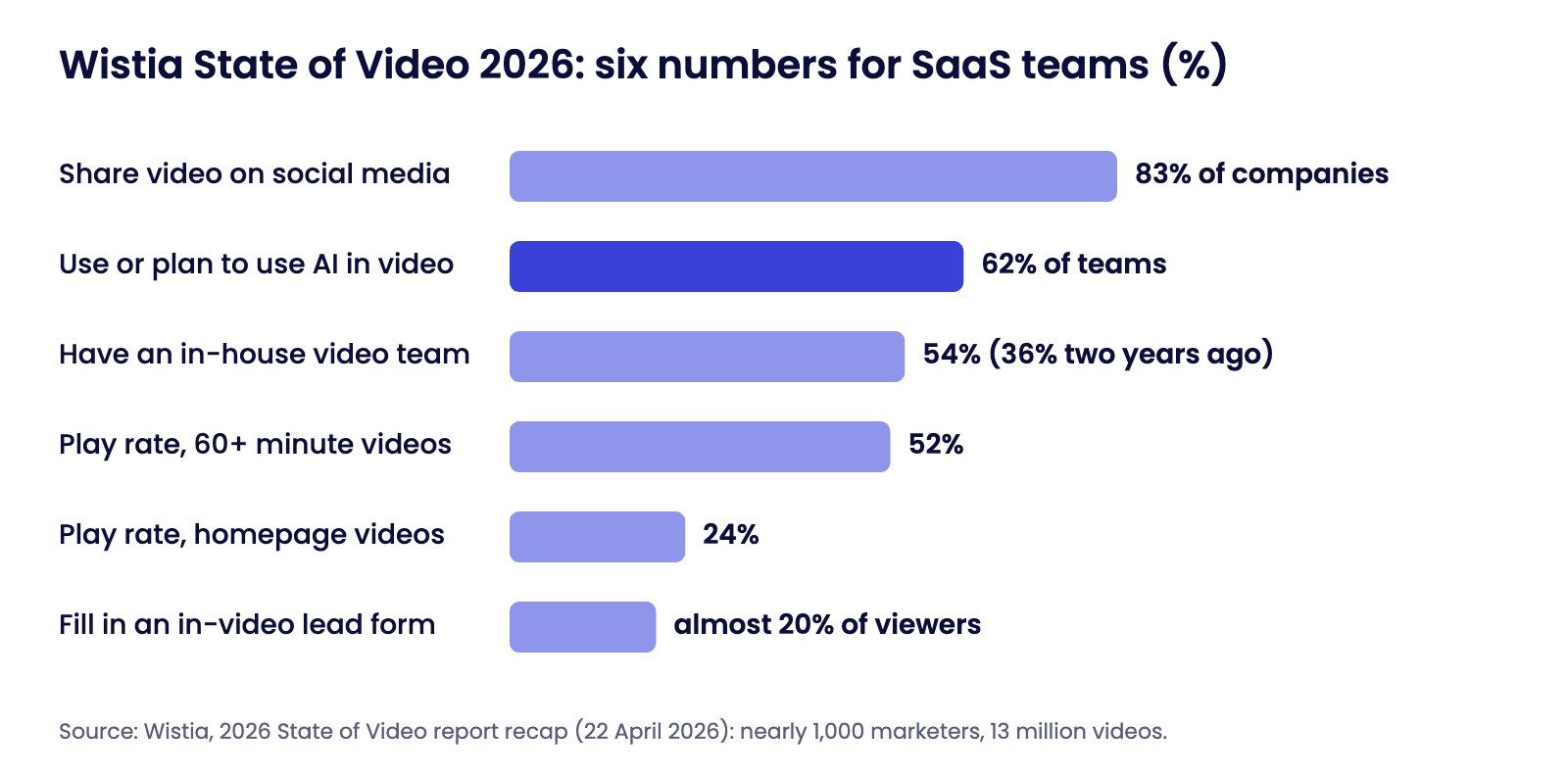
- Wistia’s 2026 State of Video report found that homepage videos have a 24 percent play rate, higher than product pages, contact pages and thank-you pages.
- After the homepage, place product demos on each feature or use-case page, a short proof video on the pricing page, the explainer again on paid landing pages, and a how-to video in onboarding.
- Give every video a poster image, captions, a play button that is obviously a play button, and a call to action next to it.
- Do not autoplay with sound, do not hide the video behind a tab, and do not let it slow the page.
Disclosure: this guide is published by Motion Graphix, an explainer video studio that is mentioned in it. The method, sources and definitions are in “About this guide” at the end of the article.
Key takeaways
- The homepage hero is the highest-value position: it has the most traffic and the highest play rate (24 percent in Wistia’s 2026 data).
- Match the video to the page’s question. Homepage: what is this? Product page: how does it work? Pricing page: is it worth it? Onboarding: how do I start?
- Placement only works if the video loads fast. Use a poster image and load the player on click so the page stays quick.
- Put a call to action beside the video, not only after it. Many viewers decide before the end.
Where each video belongs
| Page | Video | Position | Why |
|---|---|---|---|
| Homepage | 60 to 90 second explainer | In or just below the hero | Most traffic and the highest play rate; answers “what is this?” |
| Feature or use-case page | 45 to 90 second demo of that workflow | Beside the first description of the feature | Shows the product doing the job the visitor came to read about |
| Pricing page | 30 to 60 second customer proof or “what you get” video | Above or beside the plans | Removes doubt at the moment of decision |
| Paid landing page | The explainer, or a 30 second ad cut | Hero, next to the form or button | Keeps the message identical from ad to page |
| Demo-request or contact page | Short “what happens next” video | Beside the form | Sets expectations and reduces drop-off |
| Onboarding and help centre | How-to videos, one task each | At the step they explain | Reduces support tickets and speeds activation |
| Sales emails and proposals | The demo that matches the buyer’s use case | Linked thumbnail near the top | Gives the champion something to forward |
The homepage: above the fold, next to the headline
The explainer earns its cost on the homepage. Place it in the hero beside the headline, or directly below the headline and the main button, so that a visitor sees the promise in words and the proof in motion in the same view.
On mobile, stack it under the headline and button so the first screen still shows what the product is and what to do. Use a poster frame taken from the video that shows the product, not a logo, with a clear play button.
If you autoplay, do it muted and looped as a silent preview with a “click for sound” control; never autoplay with audio.
Product and use-case pages: one workflow per video
A visitor on a feature page wants to see that feature working. Embed a short demo of that one workflow beside the first paragraph that describes it, not at the bottom of the page and not inside a tab or accordion where it will not be seen.
If a product has five main use cases, that is five short demos, which is cheaper to produce as a bundle than one at a time. Formats are covered in the product demo video guide and animated product demo videos.
Pricing, contact and thank-you pages
Wistia’s data shows lower play rates on contact and thank-you pages than on the homepage, so keep videos there short and specific. On the pricing page, a 30 to 60 second customer clip or a “what is included” walkthrough answers the question the visitor has at that moment.
On a demo-request page, a short “what happens on the call” video sets expectations. On a thank-you page, a how-to or a customer story keeps the new lead engaged while they wait.
Landing pages, onboarding and email
On paid landing pages, repeat the video from the ad or its longer version so the visitor recognises the message. In onboarding, place a how-to video at the step it explains; see SaaS onboarding videos.
In email, link a thumbnail with a play icon to the page that hosts the video rather than attaching it.
Six technical rules that decide whether placement works
- Load the player on click. Show a compressed poster image first and load the video player when the visitor presses play, so the video does not slow the page.
- Reserve the space. Give the video container a fixed aspect ratio (16:9) so the layout does not jump when the poster loads.
- Add captions. Many visitors watch without sound. See silent-first video captions.
- Use the right cut for the device. A 16:9 master on desktop; consider a square or vertical cut inside mobile layouts.
- Put the call to action beside the video. A button next to the player and, if the player supports it, a button at the end.
- Mark it up for search. Add VideoObject structured data and a text summary on the page so search and AI engines can understand the video. See video SEO for SaaS.
Common placement mistakes
- The video sits below three screens of text, so most visitors never reach it.
- It is hidden behind a “Watch video” text link that looks like any other link.
- It autoplays with sound, and visitors leave.
- The same long video is used on every page instead of a short one matched to each page.
- The poster frame is a logo or a blank first frame, which gives no reason to press play.
- The player loads on page open and adds seconds to the load time.
Related guides: B2B video trends 2026, explainer video length, does your SaaS need an explainer video, SaaS video content plan, SaaS explainer video examples and SaaS explainer video cost.
Quick questions
Where should I put an explainer video on my website?
On the homepage, in or just below the hero section. Wistia’s 2026 State of Video report found homepage videos have a 24 percent play rate, higher than product, contact and thank-you pages.
Should an explainer video be above the fold?
Yes. A visitor should see the headline, the main button and the video, or its poster and play button, without scrolling on desktop and within one swipe on mobile.
Should a homepage video autoplay?
Only muted, as a short looping preview with a clear control to play with sound. Autoplay with audio drives visitors away and is blocked by most browsers.
Does a video slow down my homepage?
Not if it is set up correctly: show a compressed poster image, load the player only when the visitor presses play, and reserve the space so the layout does not shift.
Should I gate my explainer video behind a form?
No. Keep the explainer open so it can do its job. If you want leads from video, add a form inside or beside a longer demo or webinar; Wistia reports that almost 20 percent of viewers who see a lead form in a video fill it in.
How long should the homepage video be?
Sixty to ninety seconds. Longer walkthroughs and webinars belong on product and resource pages.
About this guide
Where the figures come from. Play-rate and lead-form statistics are from Wistia’s published recap of its 2026 State of Video report (22 April 2026), based on a survey of nearly 1,000 marketers and more than 13 million videos. The placement advice is drawn from our own production work for software companies.
Who publishes this
- Motion Graphix is a London-registered explainer and product demo video studio founded in 2022 by Zahid Nawaz.
- It makes SaaS explainer videos and app demo videos at a published $1,450 per video; see the pricing page.
- Corrections are welcome at the contact page.
Terms used in this article
- Above the fold: the part of a page visible without scrolling.
- Play rate: the share of page visitors who press play on a video.
- Poster image: the still frame shown in the player before the video starts.
- VideoObject: the structured-data type that describes a video to search engines.
Sources and further reading
- Wistia: The Key Takeaways From Wistia’s 2026 State of Video Webinar (22 April 2026).
- Google Search Central: Video structured data.
- web.dev: Cumulative Layout Shift, on reserving space for media.