
By Zahid Nawaz, Founder of Motion Graphix ·
Quick answer: Fintech explainer videos work when they make invisible money movements visible. The best ones open on the friction (fees, waiting, a confusing form), show funds or data moving on screen, and state the trust points (regulation, security, who holds the money) in plain words before the viewer has to ask. Below are ten examples from our own fintech work, from consumer wallets to a digital bank, with what each one does that you can copy.
Why fintech is harder to explain than other software
Three reasons. The product is often a flow, not a screen: money leaves here and arrives there, and the interesting part happens in between. The audience is nervous by default, because it is their money. And the vocabulary is either too technical (rails, custody, KYC) or too vague (seamless, frictionless). An explainer has to translate all three at once, in about 75 seconds. For the regulated version of this problem, see our fintech explainer video service.
10 fintech explainer video examples
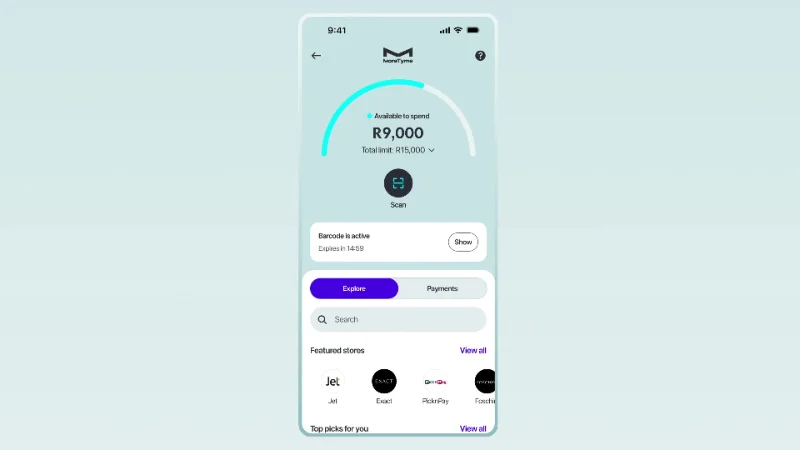
1. GoTyme Bank: calm, continuous, screen by screen
A digital bank has to feel effortless before anyone trusts it with money. This walkthrough moves through the app one screen at a time, so balances, limits and in-store payments read as a single calm flow. No cuts for drama. The lesson: for banking, pace is a trust signal. Slow down.
2. Crypto.com: isolate the step where people quit
Connecting a wallet is the moment new users give up. The video isolates each step and captions it, so passkey verification stops being intimidating. If your onboarding has one known drop-off point, build a dedicated video for that step rather than another overview.
3. Chipper Cash: give every option its own beat
Four ways to fund a wallet is three too many to explain in text. Each method gets its own on-screen moment, so a viewer can follow along with the app open. Use this pattern whenever your product offers choices: one beat per choice, never a list.
4. PayByPhone: one setting, four captioned steps
Autopay is the setting that stops parking fines, and almost nobody finds it. The video does not tour the app. It shows the four steps to switch autopay on, each captioned, and ends on the confirmation. When a single buried feature drives retention, give it its own 30-second video rather than a line in the overview.
5. KAKU Finance: one balance, five currencies, one card
Holding several currencies usually means several apps. The video shows one balance, five currencies and a card that switches on and off, and that is the entire pitch. No history of cross-border banking, no market-size slide. Read the KAKU Finance case study for how the script was cut down to that single idea.
6. Vivid: build one feature in front of the viewer
Pockets are the feature that makes the account feel organised, so the video creates one, schedules a deposit into it, then zooms out to the monthly overview. It is a demo of one feature, start to finish, rather than a montage of twelve. Consumer banking apps almost always have one feature like this. Find it and film that.
7. Exodus Pay: a tease that says almost nothing on purpose
A short, confident product tease in deep green, enough to make people look up the launch without explaining a single feature. Not every fintech video needs to explain. A launch teaser’s job is curiosity, and it should be 20 to 30 seconds.
8. Phantom: make crypto behave like cash
Crypto is easier to sell when it behaves like money people already understand. Phantom’s video uses stickers, gradients and three plain promises, aimed squarely at people who are not on chain yet. No diagrams of blocks. If your buyer is a consumer, the protocol is an implementation detail; the promises are the product.
9. Zerion and Stitch: announcements that stay on message
Zerion’s network launch runs 23 seconds with no filler: history and positions shown just long enough to register. Stitch’s funding announcement puts investor credibility up front, then stays on the payments infrastructure being built across Africa rather than on the round. Both are announcement videos, and both resist the urge to turn an announcement into a product tour.
10. Multiplier: one contract, one checklist
Hiring across borders means entities, contracts and compliance in every market. Multiplier’s explainer uses the world map once, then sends one contract and shows an onboarding checklist ticking itself off. The second Multiplier video, for employer of record, uses cut-out collage and printed textures to make a legal subject approachable. When the product is compliance-heavy, show one complete case rather than a world of dots.
Patterns that repeat across the ones that worked
- Trust words appear early and plainly. “Regulated by”, “your funds are held at”, “we never see your password”. Said once, on screen, in the first half.
- Numbers are specific. “Paid in 2 days” beats “fast”. Fintech viewers are numerate; vague claims read as evasive.
- The confirmation screen is the climax. Payment sent, account opened, money arrived.
- Length tracks complexity. Consumer apps 30 to 60 seconds, B2B infrastructure 60 to 90, with a longer cut for sales. See our explainer video length data.
- Compliance is reviewed at script stage, not after animation. Changing a claim after the voice-over is recorded is the most expensive revision there is.
What a fintech explainer costs
Every video above was made at our flat price of $1,450, including script, storyboard, animation, a human voice-over, social and ad cuts and 90 days of support. Multi-language versions, which fintech teams often need, are a $450 add-on for up to three extra languages; see our guide to localising explainer videos.
Quick questions
How long should a fintech explainer video be?
30 to 60 seconds for a consumer app, 60 to 90 for B2B or infrastructure, up to two minutes for a sales-stage walkthrough.
Should fintech videos be animated or live action?
Animated or UI-led for anything that moves money or data, because there is nothing to film. Live action or a founder on camera works for brand and trust pieces. Mixing both is common; see when to mix footage with animation.
How do you handle compliance review?
All claims are locked at script stage with your compliance team before storyboarding begins. Nothing in the voice-over or on screen changes after that without a flagged revision.
Can we see these videos?
They are all in the portfolio and on the fintech page.




